Everything a boutique studio needs. Nothing it doesn't.
Bookings, waitlists, memberships, payments, the register and reports for pilates and fitness studios, with none of the clutter.
A working demo of a studio's timetable. Nothing is really booked.
Wednesday 7 October
- 07:0050 min ReformerLena, All levelsFree cancellation until 7pm Tuesday 3 places left 2 places left
- 12:3045 min Mat PilatesJess, BeginnerFree cancellation until 12:30am Wednesday 8 places left 7 places left
- 18:3045 min BarreJess, IntermediateFree cancellation until 6:30am Wednesday 4 places left 3 places left
Thursday 8 October
- 07:0050 min ReformerLena, All levelsFree cancellation until 7pm Wednesday 6 places left 5 places left
- 09:3050 min ReformerLena, All levelsFree cancellation until 9:30pm Wednesday 1 place left Full
- 12:1545 min Mat PilatesJess, BeginnerFree cancellation until 12:15am Thursday 10 places left 9 places left
- 17:3045 min BarreJess, IntermediateYou'll be booked in if a place opens Full We'll email you
- 18:4550 min ReformerLena, All levelsFree cancellation until 6:45am Thursday 2 places left 1 place left
Friday 9 October
- 07:0050 min ReformerLena, All levelsFree cancellation until 7pm Thursday 4 places left 3 places left
- 12:3045 min Mat PilatesJess, BeginnerFree cancellation until 12:30am Friday 7 places left 6 places left
- 18:0050 min ReformerLena, All levelsYou'll be booked in if a place opens Full We'll email you
Saturday 10 October
- 09:0050 min ReformerLena, All levelsFree cancellation until 9pm Friday 2 places left 1 place left
- 10:1545 min Mat PilatesJess, BeginnerFree cancellation until 10:15pm Friday 6 places left 5 places left
- 11:3045 min BarreJess, IntermediateFree cancellation until 11:30pm Friday 3 places left 2 places left
Sunday 11 October
- 10:0045 min Mat PilatesJess, BeginnerFree cancellation until 10pm Saturday 9 places left 8 places left
- 11:1550 min ReformerLena, All levelsFree cancellation until 11:15pm Saturday 5 places left 4 places left
Try it: book a class, join a waitlist or pick another day. It's a demo, so nothing is really booked.
Watch the 2-minute tour
Your side first: the overview, timetable, prices, cancellation rules, emails, posts, inbox, register and reports. Then what your clients see when they book.
With a voiceover, and captions if you watch without sound.
What your clients see
Most people book on their phone, in a spare minute. Pulse keeps it short: pick a class, book it, and see when they can cancel for free. Any fee is shown before they book.
-
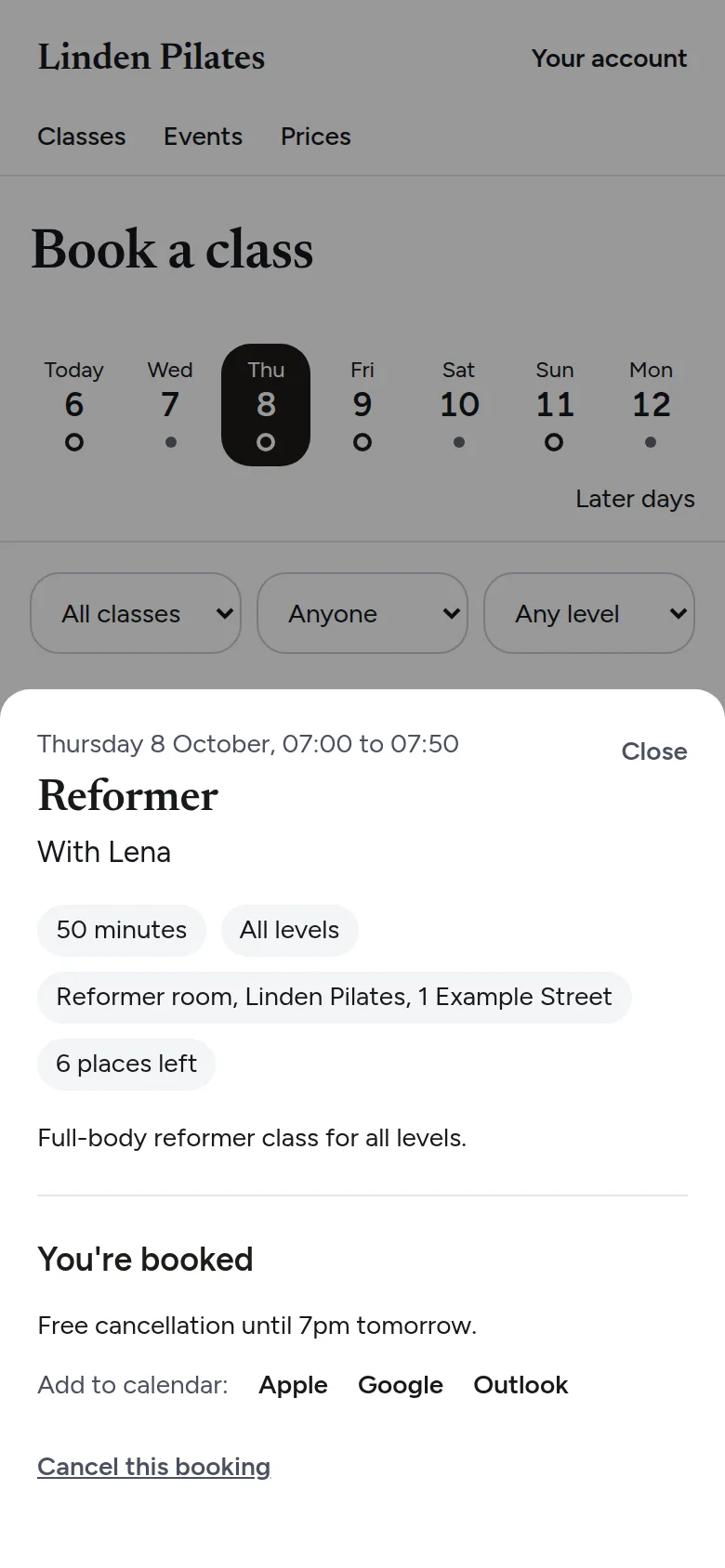
Booked, with the free cancellation time and a link to add it to their calendar.
-
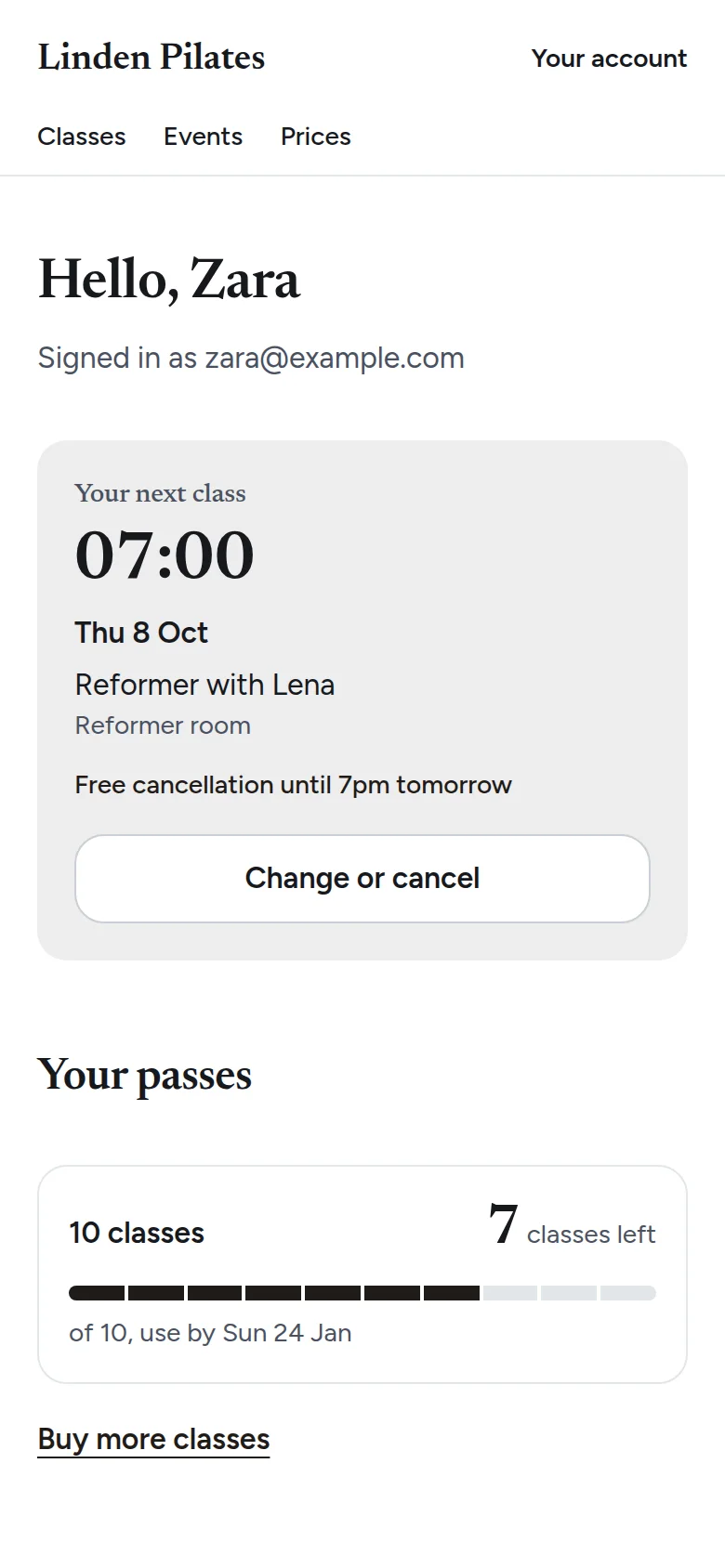
Their next class, and how many classes they have left.
-
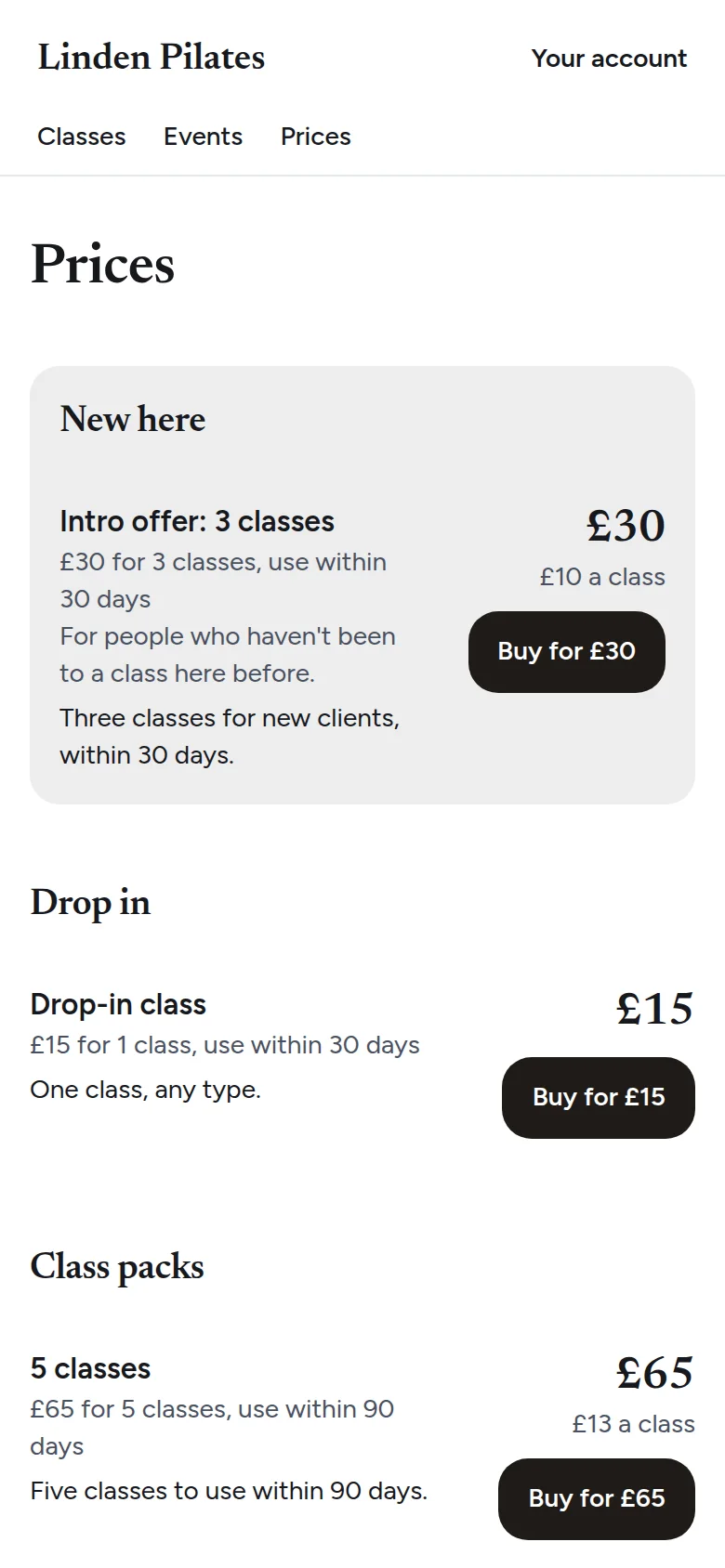
Intro offers, packs and memberships, each with its price per class.
Your studio's website, built in
Your home page on Pulse can be your whole website. Fill it in once, and the classes, team and prices on it keep themselves up to date.
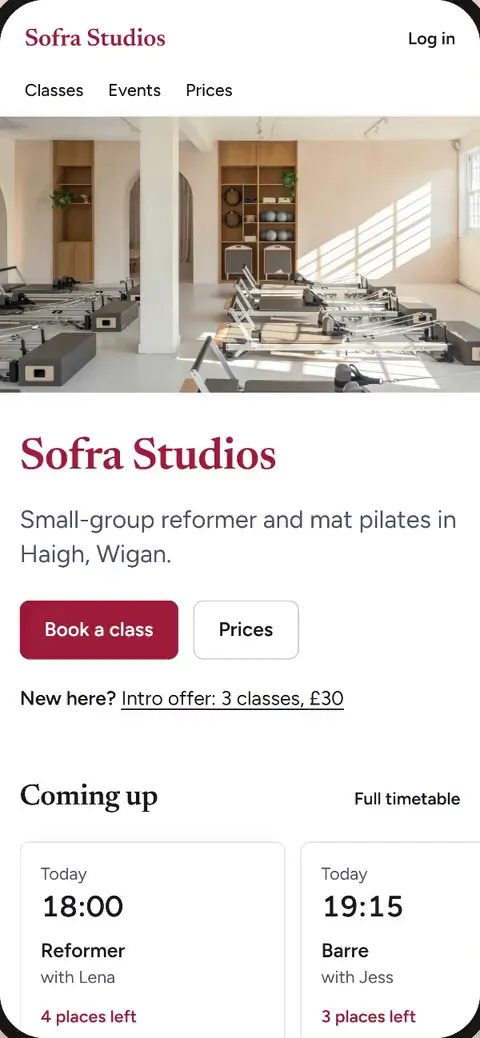
- Cover photo
- Coming up
- About
- Classes
- The team
- Photos
- Prices
- First visit
- Questions
- Opening hours and links
- Your words and photos
- Write your about, first-visit note and questions, and add up to eight photos, in Admin.
- Never out of date
- The next classes, places left, team and prices come straight from your timetable and price list.
- Booking is right there
- Book a class sits under your name, and someone new sees your intro offer straight away.
Your studio at a glance
Sign in and see what needs you, what you took this week and who's coming today. Everything else is a tap away.
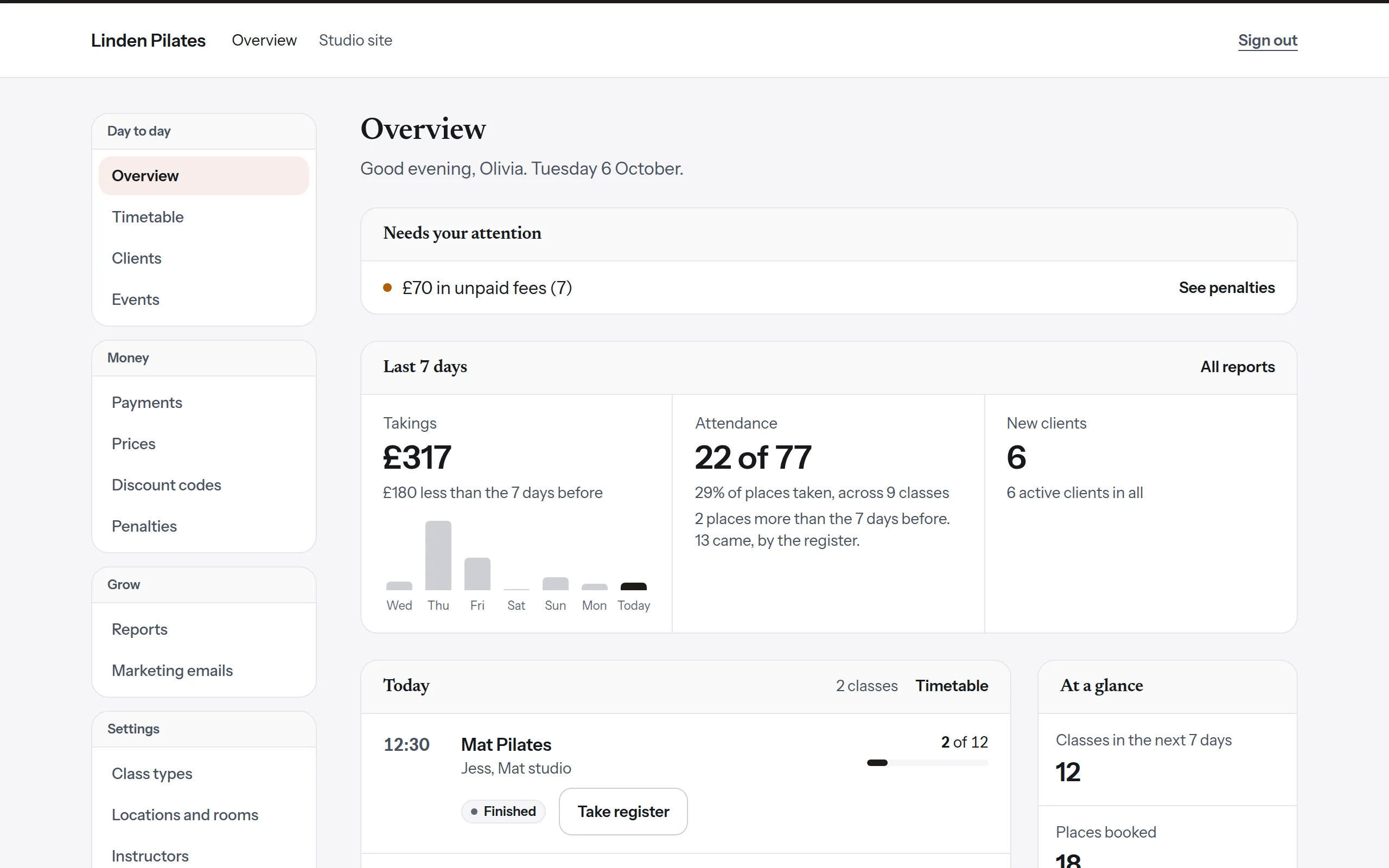
- Needs your attention
- Unpaid fees, failed renewals and cards about to expire, in one list.
- Takings and attendance
- This week against last, day by day, with eight reports behind it.
- Today's classes
- Who's booked, how full each class is, and the register.
A register on the instructor's phone
Instructors see their own classes and tap people in at the door, with undo. Anyone not checked in is marked as a no-show after the time you choose, and anyone with a health note is flagged.
A working demo of an instructor's register.
- Amir H.
- Bea L.
- Dina O.
- Eli S.
- Zara Q.
Try it: tap Here as people arrive.
Replies in one place
When a client answers a booking email or a newsletter, or writes to you from their account, it comes into Pulse, not someone's personal inbox. Anyone on your team can pick it up and answer.
A conversation in the studio's inbox: Grace asks about parking, and Sam answers from the studio.
- Replies and messages come to Pulse
- From booking emails, reminders and newsletters, or written in their account or your app, with an email to let you know.
- One conversation per client
- Everything they've written and every answer, in order, with unread ones marked.
- Answer from Pulse
- They get your reply as a normal email from your studio's name, and can read it in their account too.
Your studio's look, not ours
Your logo, colours, fonts and corners on every page and email. Pulse checks your colours stay easy to read, and your clients never see a list of other studios.
-
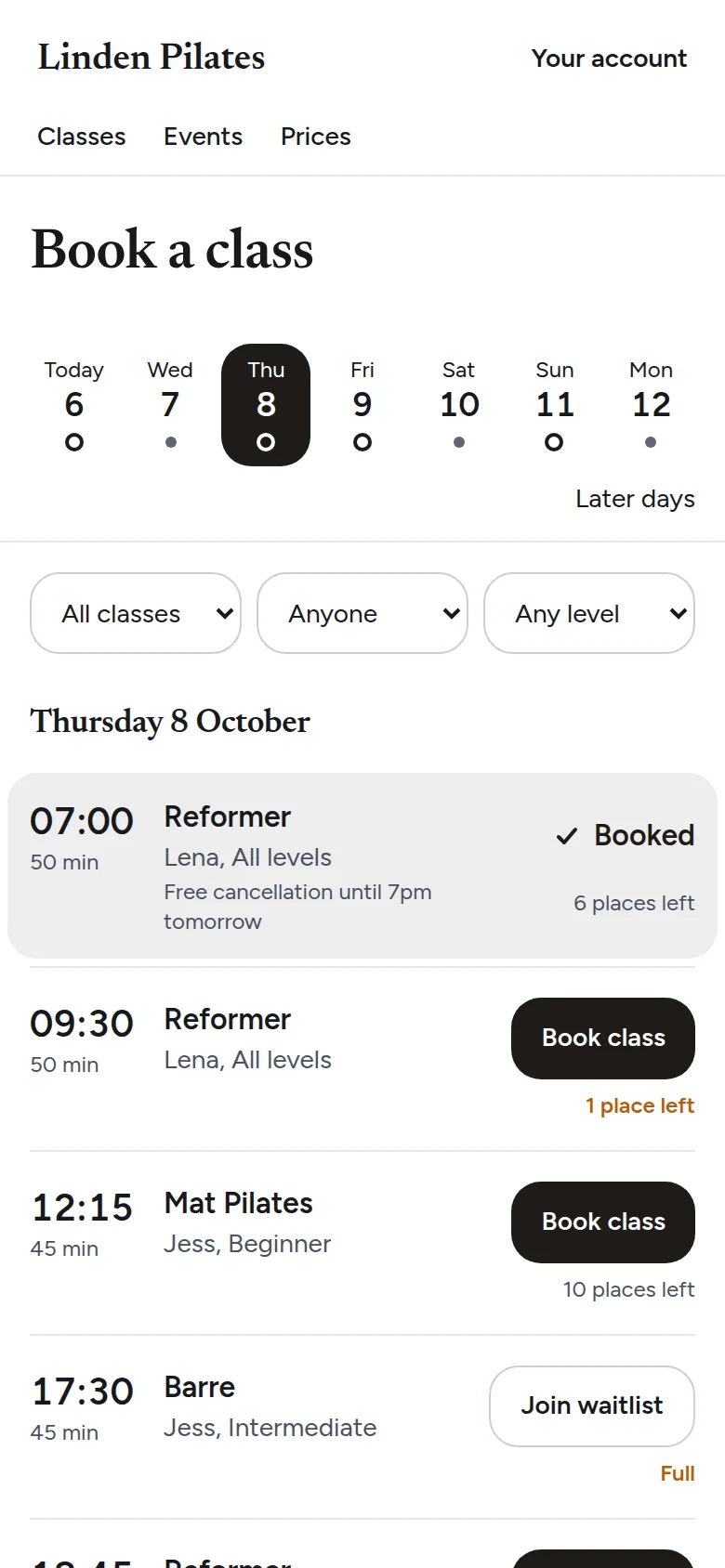
Linden Pilates
-
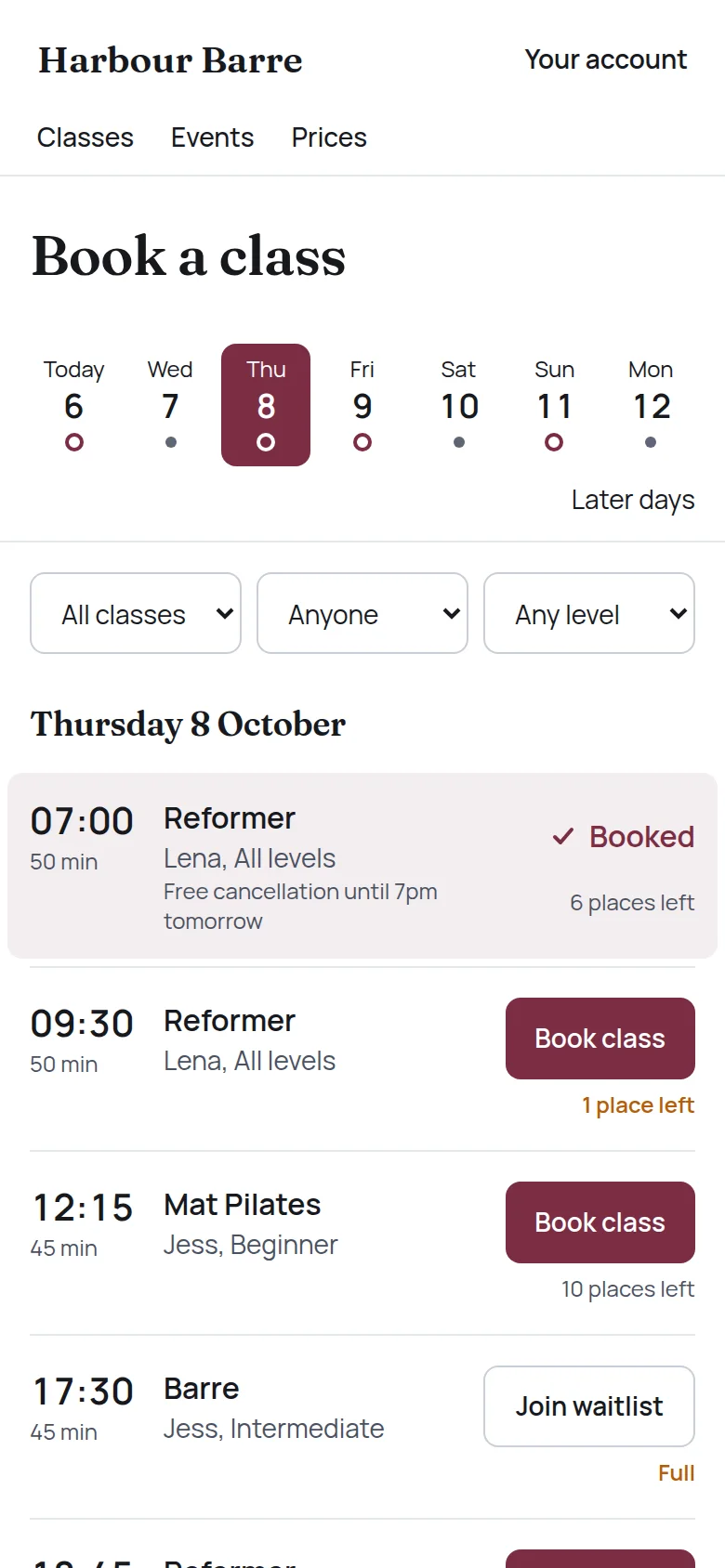
Harbour Barre
-
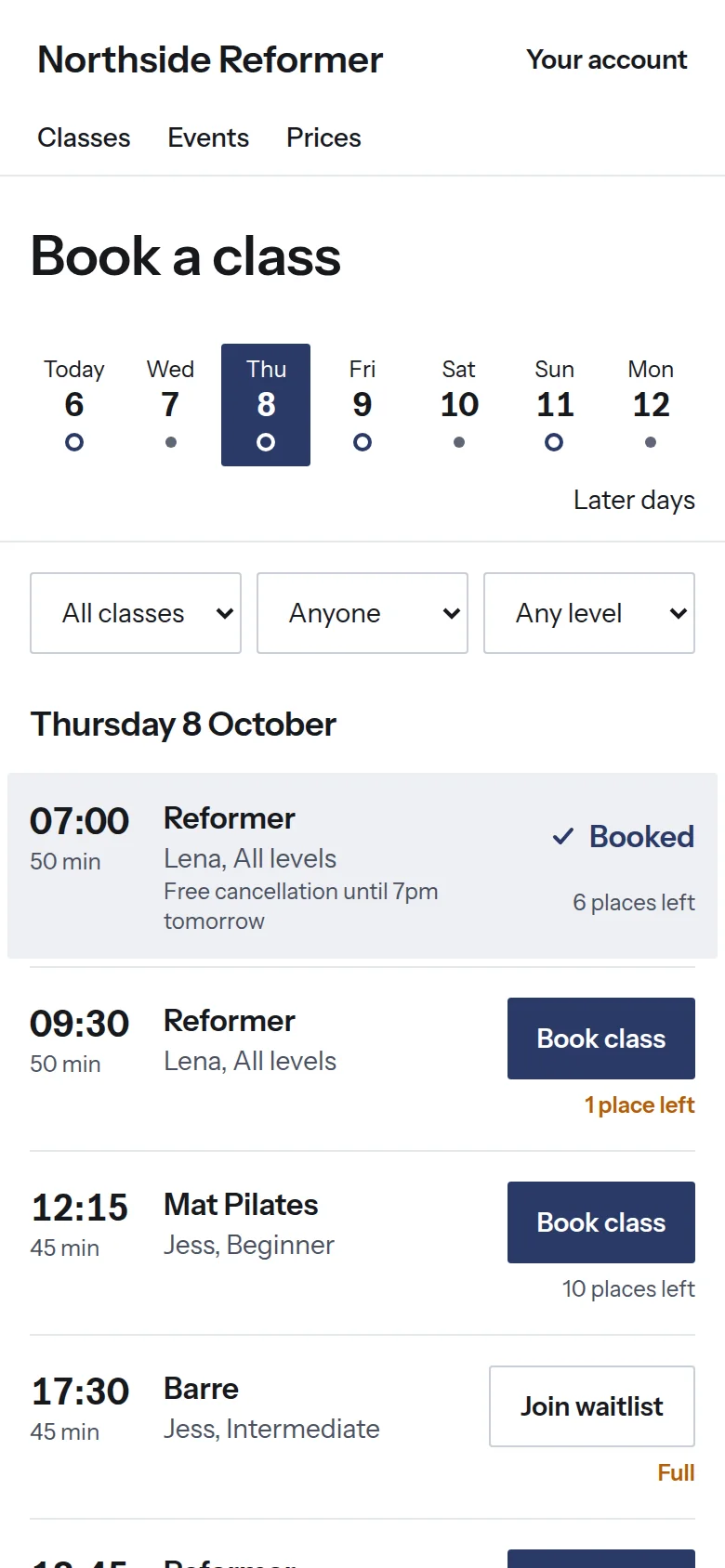
Northside Reformer
Ask your studio a question
An assistant for owners and admins. It reads your own reports and answers in plain English, with a link to the report behind every answer. It sees totals, never client names or health answers.
- How much did we take last week?
- Which classes were fullest this month?
- Whose card runs out before their next renewal?
- How many clients haven't been in for sixty days? Write them an email.
It writes the draft. You press send.
The assistant can write to your clients, but it has no way to send. Only you can, with one tap.
- You see the whole email
- Exactly as your clients will receive it.
- You see who gets it
- How many it reaches, how many are left out, and the full list.
- It checks again when you tap
- If anything changed since you looked, nothing is sent and you're asked to look again.
Everything that's included
A timetable that fills itself
Waitlists that tell everyone the moment a place comes up, weekly classes made twelve weeks ahead, and events with tickets.
Your website, built in
A home page with your classes, team, photos, prices and questions, that can be your whole website.
Packs, memberships and intro offers
Drop-ins, class packs, intro offers and memberships that renew weekly, monthly or yearly, with a minimum term if you want one.
Paid straight to you
Payments go into your own Stripe account. Clients with a saved card pay in one tap.
Late cancels and no-shows
Your rules, shown before anyone books, and fees charged the same way for everyone.
Emails that bring people back
Win-back, thank-you and renewal emails that send themselves, and campaigns you check first.
Posts for Instagram
Eighteen kinds of post in your colours, in three looks and three sizes, with the caption written.
Messages in one place
Replies to your emails, and messages clients write from their account, in one inbox your team shares.
Eight reports
Revenue, attendance, renewals and cards about to expire, each with a CSV.
Private health answers
Kept apart and seen only by the people who need them. Clients can download or delete their data.
A link for every price
Copy a link to any pack or membership and share it in your bio or a message.
Moving from another system
Bring your clients, classes left and billing dates, and run both side by side until you're ready.
How Pulse compares with other booking systems
The full detail
Timetable and bookings
- The last place goes to one person
- Places are locked while someone books, so two people can never get the same one.
- A waitlist that tells everyone
- When a place opens, everyone waiting is told by email, and on their phone if they have your app. The first to book gets it.
- Weekly classes, made ahead
- Set a class once and Pulse creates the next twelve weeks, with times that stay right when the clocks change.
- A register on the instructor's phone
- Tap Here or No-show, with undo. Anyone with a health note is flagged.
- Reminders, changes and events
- Reminders go out a day before. Cancel or move a class and clients are told and given their class back. Sell tickets to workshops, refunded automatically if you cancel.
Late cancels and no-shows
- You choose the rules
- A late window, then the class lost, a fixed fee, both or nothing. First offence free, free late cancels in a membership, and strikes with booking bans.
- Clients agree first
- Acceptance of your policy is recorded, and no card is charged without it. Each fee is charged once and retried if declined.
- Fair and traceable
- No fee if you cancel or move a class. Every fee has a page of evidence for a dispute.
Money
- Your own Stripe account
- Payments land with you. Card details never touch Pulse.
- What you can sell
- Drop-ins, class packs, intro offers and memberships that renew weekly, monthly or yearly, with a minimum term of 3, 6 or 12 months if you want one.
- One tap with a saved card
- A client with a card saved at your studio books and pays from the class itself, with their bank's check if it asks for one.
- Failed payments
- Clients get an Update card prompt and keep booking for the grace days you set.
- Discount codes and links
- A percentage or a fixed amount, with dates, a use limit, once per client, or new clients only. Copy a link to any price to share it anywhere.
- Receipts, refunds and reports
- Numbered receipts, full or partial refunds, and eight reports with a CSV: revenue, attendance, no-shows, memberships, classes not yet used, failed and upcoming renewals, and cards about to expire.
- Three automatic emails
- We want you back, thanks for coming, and your membership is nearly up. Switch each on, and change the days and wording.
- Campaigns you check first
- Start from a ready-made email or write your own, see every recipient, and send yourself a test.
- An inbox for replies and messages
- Clients' replies to your emails, and messages they write from their account, come into Pulse, one conversation each, and you answer from there.
- Consent and sensible limits
- The marketing box is unticked at joining, every email has a one-click unsubscribe, and no client gets more than one a week.
Client data
- Health answers kept apart
- Only the owner, admins and the instructor teaching that client can read them, never in emails or logs.
- A waiver in your words
- Up to twenty questions of your own. When you change it, clients sign the new version before their next booking.
- Clients own their data
- They can download everything held about them, or delete it.
- Sign-in and backups
- Owners and admins use an authenticator app. Your data is backed up, encrypted, every day.
Your branding
- Logo, cover image and colours
- Pulse picks text colours that stay readable, and tells you if one had to change.
- Type, corners and wording
- Four font pairings, sharp, soft or rounded corners, and your own policy and waiver text.
- A home page that can be your website
- Cover photo, what's coming up, about, classes, the team, up to eight photos, prices, a first-visit note, questions, opening hours and links.
- Posts for Instagram
- Eighteen kinds, bold, clean or with a photo, as a square, portrait or story, with a caption to copy.
Moving from another system
- Import from a spreadsheet
- Preview it and fix any rows before importing. Names, emails, passes, classes left and billing dates come across. Booking history, waivers and saved cards do not.
- Memberships restart on their own date
- Each client gets an email a week before to restart theirs here.
£75 a month, with every feature included.
Or £750 a year, which is two months free.
- No contract
- Pay monthly and stop whenever you like.
- Moving over, done for you
- We set your studio up and bring your clients across from your old system, at no charge.
- Nothing taken from your takings
- Clients pay you directly through your own Stripe account. You pay Stripe's card fees, and nothing extra to us.
Founding studios pay £49 a month.
For the first 10 studios to join. Your price is fixed for your first year, and you can renew at the same price.
Tell us about your studio
Pulse is new, and we're taking on studios one at a time.
Instagram posts, ready to share
Pick a post and Pulse makes it from your timetable, prices and photos, in your colours and fonts, with the caption written. Download it, copy the caption, and post.
The week's classes, in the bold look.
The intro offer, in the photo look.
Today's classes with places left, in the clean look.